Feb
15
2009
This might be nice for those of us that are color-challenged :)
28 posts
This might be nice for those of us that are color-challenged :)
Yes, I signed them as well :)
As part of my new job, I got myself a MacBook pro and have been running Bootcamp on it over the last few days. All in all the experience is good, but there are issues with Windows running on the MacBook that bother me (bad sound drivers, and the fact that the clock resets on each startup). However, before I installed BootCamp I spent quite a bit of time on the Mac and got over some of my "floating windows" phobias. To that end, I'm considering going all the way and switching to OSX. So to get to my point, is there anyone out there that's recently been through this that can give me some pointers on what I might miss?
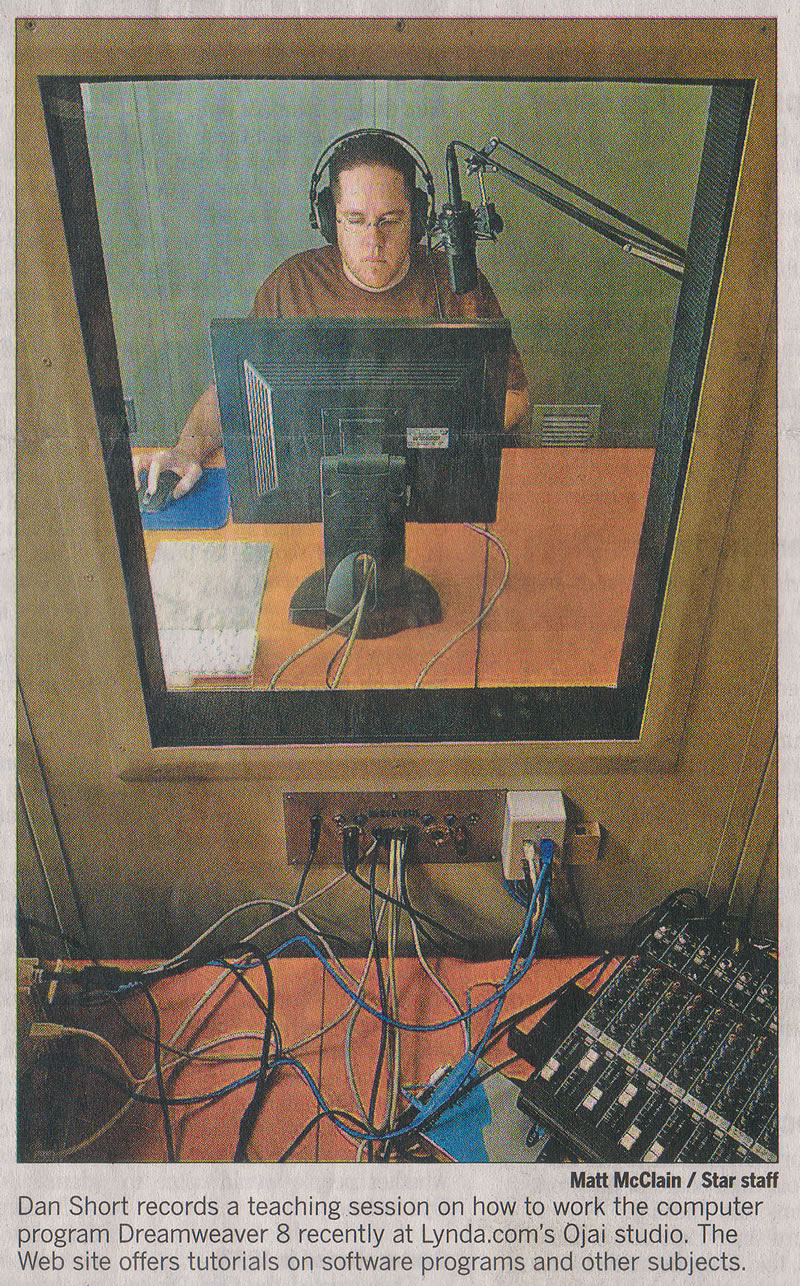 While I was in Ojai recording the Dreamweaver 8 Beyond the Basics title for lynda.com there were some reports from the Ventura County Star writing an article on lynda.com. They wanted to take a few photos of someone doing a recording, and they ended up using a shot of me on the front page of the Business section of their February 15th article. See mom and dad, I really do do real work :). Click the image for a larger version.
I finished up the new Dreamweaver 8 Beyond the Basics title for lynda.com on Friday. After 4 solid days in a little sound-proof room, it's time to head back home and catch up on all of the emails and questions from readers. The Beyond the Basics title covers advanced template usage, building multi-column CSS layouts, using some rapid coding techniques in Dreamweaver you might not have known where there, as well as a chapter on getting your feet wet with dynamic development in Dreamweaver 8.
With little fanfare (blow your trumpets please!) Macromedia Adobe introduced a new feature in the Dreamweaver 8 updater regarding template paths (see the full technote for more information).
I got my copy of Dreamweaver 8 Hands-on-Training today. The pages are still warm from the printer, and it looks damned good if I do say so myself. So buy your copy today, I have x-mas presents to buy y'know!
Business Week has a great interview with one of the owners of 37Signals on their design philosophy and why it's a good idea to keep things simple.
I found this really slick utility through Digital Media Minute. CSSVista (a free application, Windows only folks) allows you to edt your CSS live in both IE and Firefox... (wait for it...) at the same time. It opens a copy of your page in IE and Firefox in a split view window. You can then edit the CSS just like you would in Firefox and your changes are immediately displayed in both browsers.
Well it looks like AOL has finally dropped a new Netscape. Thankfully, this one is based off of Firefox 1.0, so it should render great and be pretty stable. I haven't downloaded it yet, so if you've played with it or know of any known issues not currently in their release notes, let me know how it goes.
That's right, Intermediate Dreamweaver MX 2004 is now available from the online training library at Lynda.com. Sign up and view it today (cause you love me... :-).
After much twiddling, fiddling and testing of Macs, the Toggle-O-Matic Suite of behaviors is officially released. It's one of the most deceivingly simple yet powerful extensions out there (in my honestly biased opinion). The suite includes the ability to toggle classes, as well as the display and visibility CSS properties. Used in combination you can create all manner of complex menus and applications (pictures by yours truly). Lots o' fun I tell you...
Well it turns out that my funky list space was due to whitespace in the code (dirty rats). For example, this caused reserved space in IE on the PC:
While building a tree based menu with a soon-to-be-released DWfaq extension, I started running into some very odd issues. The navigation is your typical +/- tree based menu. In order to get the + and - icons to be clickable, I set them as a background image on my <a> tags, and added some left padding to them. This worked well in Mozilla and IE on the PC and Safari on the Mac. However, IE on the mac would display the hand cursor over the + and - buttons, but they weren't clickable, you had to actually click the text to make it work. In order to fix the clickable issue on IE5 Mac, I set the anchor tags to display: block. Perfect in IE Mac, but this caused another problem....
Posting this to my blog from the new FireFox browser (used to be FireBird) and I must say that it's pretty darn slick. Faster, still with the same great developer tools like CSS edit, but there's also a new DOM Inspector. Talk about tasty stuff :)
First week of March I hit the sound studio with Garo Green to record the new Intermediate Dreamweaver MX 2004 CD-ROM. It's gonna be good stuff peoples :)
Using Mozilla Firebird you now edit CSS live on a page. Press Ctrl+8 after installing the extension and you get a wonderful little sidebar with the CSS ready to hand edit. Changes are made instantly in the browser so you can see exactly what's going on as you type... just too damn cool... [Get Firebird here]
I don't know who told them they could put my picture on the cover. I only gave them permission to put it on the inside....
Studio MX has been officially launched. Find out more at Macromedia.com. I'll be giving some of my own impressions over the next week or two, but right off the bat I'll tell you this version is worth buying if for no other reason than the improved CSS support... nuf said for now.
For the love of all things holy, some designs go crazy wild when it comes to tons o' angled corners for that high tech feel. And it can be done without tables :): EliteDetox.com.
Yep, and even in a table-less layout with multiple flash elements from full navigation to a 300k movie. :-D
After more than 2 years with my old site design, I've finally updated Web Shorts with a new look. Hope ya like it :)
Was playing a bit with getting a completely different looking layout without actually moving the placement of my DIVs in the code. The Ashleep theme is the result of that. Not really happy with it yet, because Mozilla adds extra padding to the top divs in the sidebar and neither IE nor Mozilla seems to draw them the right percentage width.
Well, I made it look better in Netscape 4.x, but not by much :). Mostly I just had to change div#layername to #layername in my style sheet. Netscape 4 wasn't liking the tag reference in there.
That's right, I'm being strict. XHTML Strict to be exact. What did it take? Removing target attributes and borders from links and images. <br /> instead of <br>. Hmm... that's about it :). Dontcha just love it. Check out my article on MM DesDev (The X(HTML) Files) to learn a little more.
I was going through some old Alistapart articles and ran across one on switching style sheets with javascript, so I thought.. what the hell. Now you can switch between a Multicolored version or one in Shades of Gray.
I thought the day would never come, but my blog (I'm going to maintain that's the case anyhow) has helped convert a longtime NN 4.x dweeb to NN 7 (he'll soon be moving to Moz if I have my way). You guessed it, Danilo ditched the 4.x beast and is browsing in style.
Skeptic: Dan, Dan, Dan... I see tables on this page, but your logo at the top says "sans tables." What's up wit dat?
Dan: Skeptic, skeptic, skeptic... "sans tables" means that I'm not using tables for layout purposes. I'm not using shims and 's to hold table cells open.
Skeptic: But aren't tables evil, shouldn't you be using CSS instead of tables?
Dan: There's where you're wrong. In fact, in CSS2, there are numerous styles just for dealing with tables and their styling. Look at the style sheet on the blog, and you'll see a style like "border-collapse: collapse". This is a style just for tables. In fact, there is absolutely no formatting information on the table tags in my posted schedule. All colors and borders are done with CSS. Use tables to your heart's content, so long as it's for tabular data, such as the DEVCON schedule below. Tables aren't evil, they just need to be used in the right context.
Skeptic: Ahhh... now I feel better...